- Features
- Trackdesk Growth MarketplacesBecome a Trackdesk Partner
-






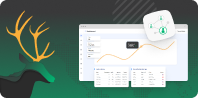


All-In-One Affiliate Dashboard
Everything You Need in an Affiliate Dashboard
Trackdesk’s drag & drop dashboard lets you organize your affiliate data exactly how you want. Move, resize, and configure widgets for a custom view tailored to your priorities.
Drag & Drop Widgets
User Specific Customization
Enhanced Visibility
Custom Drag & Drop Dashboard









What Is It? 🤔
It’s a centralized dashboard where you and your affiliates can track performance metrics at a glance. From top-performing offers to payout summaries and conversion trends, the interface is clean, fast, and easy to navigate. Each user can personalize their view using drag & drop widgets and set their own default filters. Admins can define global defaults, ensuring a consistent experience across teams.
Why Do You Need It? 👀
A clear overview = faster decisions:
✅ Real-Time Data
Monitor clicks, conversions, and revenue as they happen.
✅ Affiliate Access
Each partner gets their own dashboard to view performance and assets.
✅ Clean & Simple
No feature bloat — just the right data, presented clearly.
✅ Customizable Layout
Drag, drop, resize — personalize the dashboard experience.
✅ Easy Invites
Send one link, affiliates sign up, and tracking starts automatically.s at a glance.
How To Set It Up? ⚙️
Go to Dashboard from your Trackdesk admin panel.
Review performance metrics and key widgets.
Filter data by offer, affiliate, status, or time period.
Customize layout using drag & drop (user-level).
Set global defaults for your team (admin-level).

Join the Smart Companies
Already Using Trackdesk





Frequently Asked Questions
Yes, drag and drop widgets to reorder and resize.