How to Track Affiliate Sales and Challenge Purchases for Prop Firms
Learn how to track affiliate challenge purchases, paid resets, and renewals for prop firms, manage attribution, and prevent duplicate conversions.

Ten challenge purchases might look like ten new traders in your affiliate reports. But some of those sales could come from existing customers buying another challenge or paying for a reset.
To understand who's bringing in new traders and who's driving repeat sales, you need to connect each confirmed payment to the trader's purchase history and affiliate referral. That means keeping data connected across your checkout, CRM, and affiliate tracking software.
Here's how to track challenge purchases, paid resets, and renewals without losing attribution or counting sales twice.
TL;DR
- Track confirmed payments and distinguish first-time challenge purchases, repeat purchases, paid resets, and renewals.
- Connect trader, evaluation, and transaction IDs to preserve purchase history and affiliate attribution across systems.
- Establish clear attribution rules for returning traders, additional evaluations, and purchases involving multiple affiliates.
- Prevent duplicate sales and identify missing conversions with unique payment references, conversion status updates, and transaction-level reporting.
- Use Trackdesk to connect affiliate referrals to challenge purchases, configure attribution rules for repeat sales, and monitor individual transactions.
Define What Counts as an Affiliate Sale in Your Prop Firm
A confirmed payment for a challenge or evaluation product is the starting point for tracking affiliate sales. Registrations, unpaid orders, and account activation tell you about other stages of the trader's journey, but they don't necessarily represent revenue.
In practice, you'll want to track four types of paid transactions.
| Purchase type | What it represents |
|---|---|
| First challenge purchase | The trader's first paid challenge purchase within your defined scope. |
| Repeat challenge purchase | A new challenge purchased by an existing trader, either as a fresh attempt or as an additional evaluation account. |
| Paid reset | A payment to restart an evaluation with its trading progress reset. |
| Evaluation renewal | A payment for the next billing period of an existing subscription-based evaluation. |
For example, Topstep's Trading Combine subscriptions can renew monthly, and traders can also purchase resets or open additional evaluations.
One detail worth noting: a new evaluation account does not necessarily mean a new customer. Use the trader's purchase history to distinguish first-time buyers from returning customers, regardless of which affiliate referred the latest purchase.
An included move to the next phase or a free reset brings in no new purchase revenue. A separately billed phase, however, represents another payment associated with the existing evaluation.
Of course, tracking a payment doesn't mean you have to pay a commission on it. Even if your affiliate terms exclude certain purchases from commissions, those transactions can still be relevant to your sales analysis.
Define What Qualifies as a First Purchase
What counts as a first purchase? The trader's first-ever payment to your firm? Their first purchase of a particular product? Or their first payment on an evaluation account?
Google Analytics makes a similar distinction between new and returning customers when recording purchases, based on a defined lookback period.
Your answer determines how you count new customers and which purchases qualify for first-purchase commissions.
For example, an existing trader buying a newly launched challenge may qualify as a first-time buyer of that product while remaining a returning customer of your firm.
To tell these buyers apart, you'll need the purchase history from your CRM or customer database, including transactions that predate your current affiliate tracking software.
If you're migrating an existing affiliate program, don't leave those earlier purchases behind. Otherwise, you risk counting returning traders as new customers.
Connect Affiliate Referrals to Challenge Payments
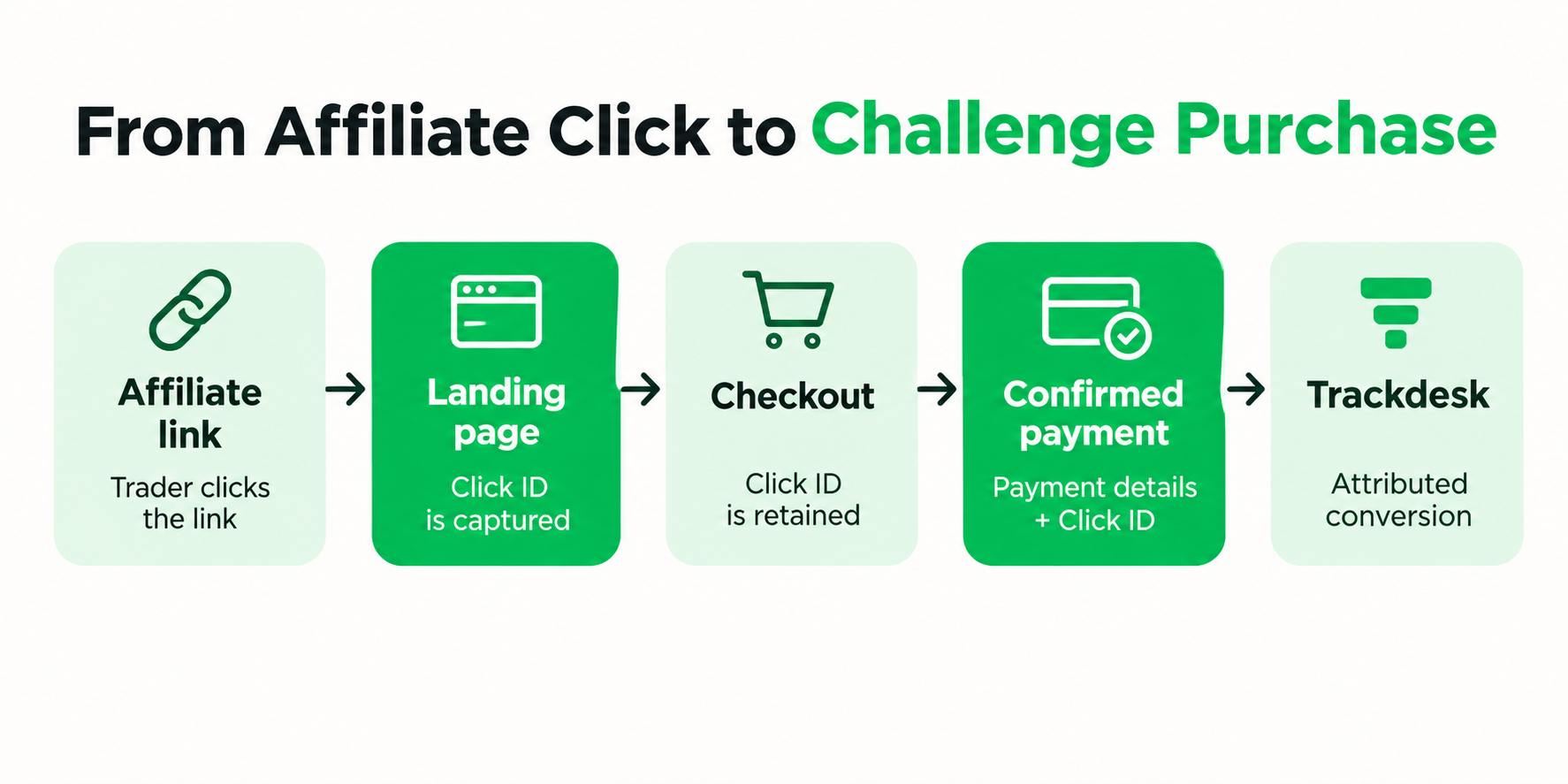
A trader might arrive through an affiliate link, log into their dashboard, and complete a purchase through a separate checkout. If the referral information disappears along the way, the payment can succeed while the affiliate sale goes unrecorded.
That's where the click ID comes in. It connects the original affiliate visit to the purchase. With redirect tracking in Trackdesk, that reference travels in the landing page URL. Your system saves it and sends it back when reporting the conversion.
You can then trace a reported sale back to its referring visit.
Connect Trader, Evaluation, and Payment Data
When an affiliate asks why a challenge purchase is missing from their report, you'll need to find the account and payment they're referring to.
Three IDs will help you do that:
- Trader ID: Identifies the customer across multiple purchases.
- Evaluation account ID: Connects a payment to a particular evaluation or attempt.
- Payment ID: Identifies an individual transaction, including a challenge purchase, reset, or renewal.
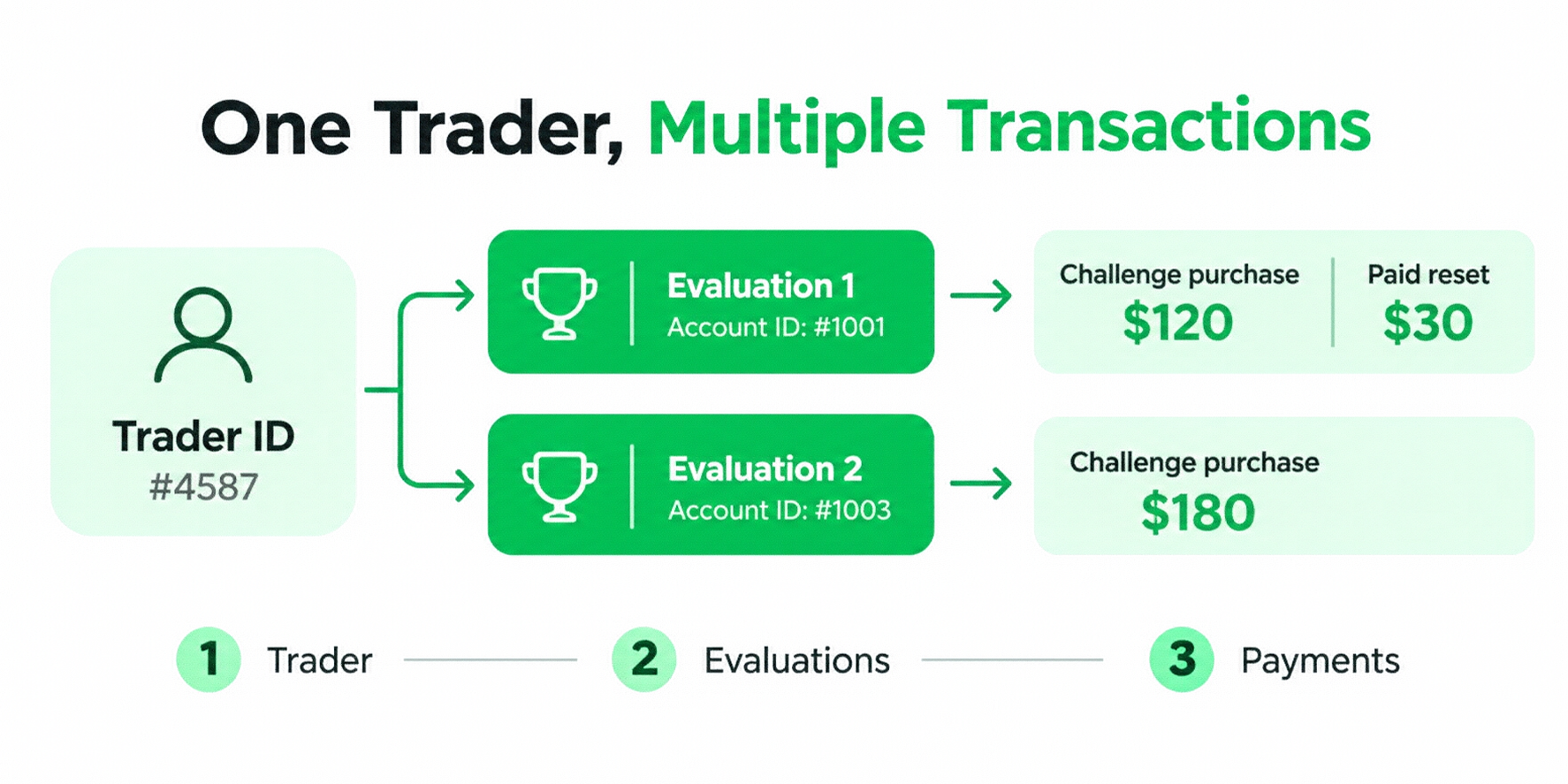
Alongside these IDs, record the purchase type, amount paid, currency, payment time, and status.
For example, if a trader pays $150 for a $100,000 evaluation, report $150 as the sale amount.
When reporting purchases through Trackdesk's conversion API, you can include referral identifiers, conversion types, amounts, customer IDs, and custom parameters.
Pass these purchase details through your integration so you can look up a missing sale by its transaction or account ID.
Meanwhile, keep the full customer and evaluation history in your CRM or source database.
Track Confirmed Payments With Server-to-Server Tracking
Traders won't always return to a thank-you page after completing a payment. Some payment confirmations may also arrive after the checkout session has ended. For example, Stripe recommends listening for payment events on the server rather than relying on a return to the checkout landing page.
With server-to-server (S2S) tracking, the system confirming the payment can report the conversion directly to your affiliate tracking platform through a server-side notification, commonly called a postback.
You'll still need to include the original referral identifier when reporting the payment. If a trader completes the purchase on another device, for example, your integration needs a recognized customer connection or an affiliate code to establish the referral source.
Before setting this up, check which referral details your prop CRM, checkout, and payment system already store. Work with your technical team to fill any gaps.
Track Affiliate Attribution Across Repeat Purchases
A trader may return months after their first challenge purchase through a different affiliate. Who gets credit for the new sale?
The answer depends on how you've set up your attribution rules.
Set Attribution Rules for Affiliate Links and Promo Codes
First-touch attribution credits the earliest qualifying affiliate click, while last-touch attribution credits the most recent qualifying click.
But what happens when a trader follows one affiliate's link and uses another affiliate's promo code at checkout?
Without a clear attribution rule, both partners may expect credit for the same sale.
You can resolve these conflicts by choosing whether the click ID or coupon code takes priority in Trackdesk's conversion attribution settings. Click-versus-coupon priority applies across your account, while first-touch and last-touch settings can be configured for individual offers.
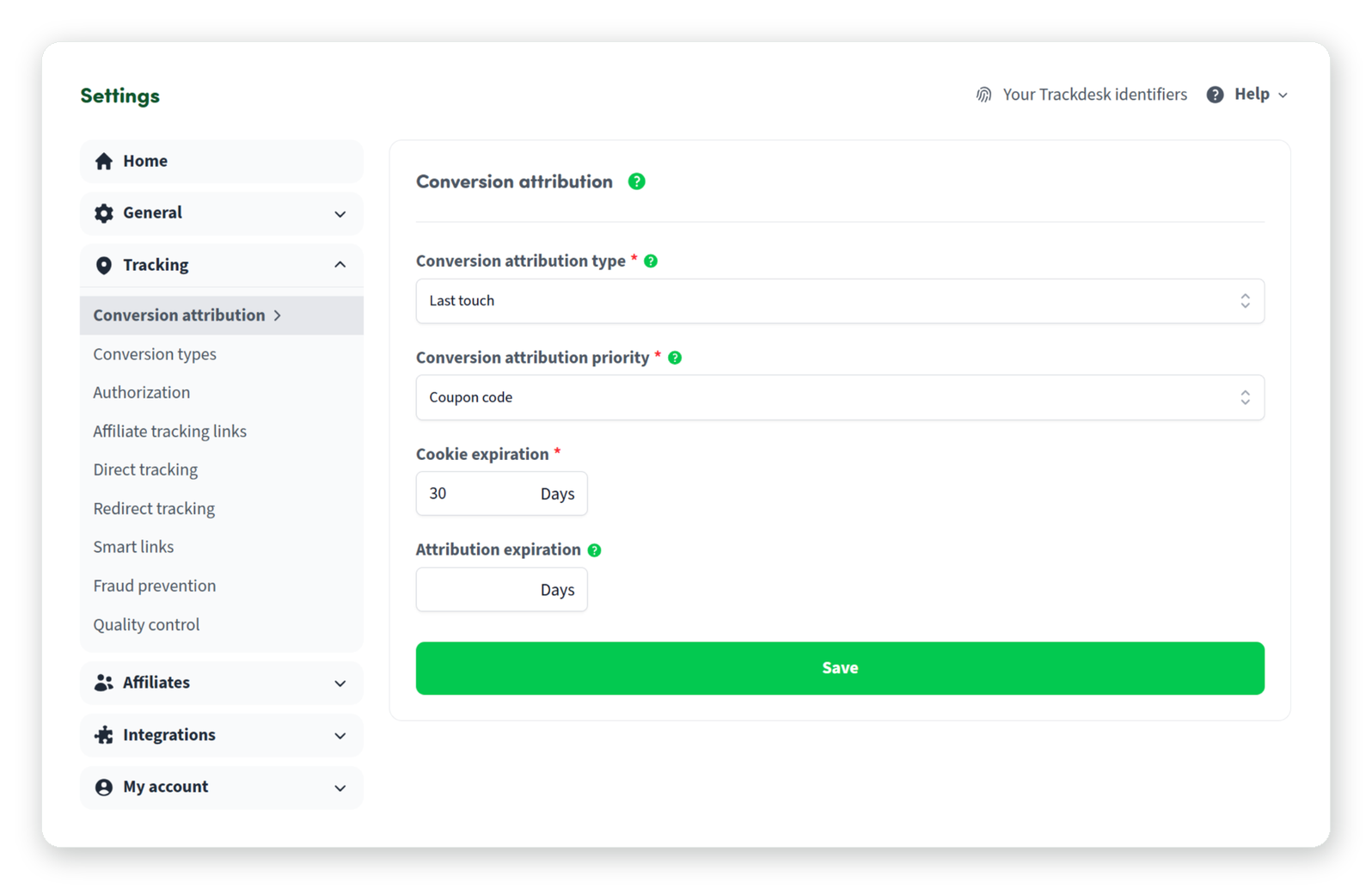
It's worth setting this priority upfront so you can explain your decision if partners dispute a sale.
Attribute Resets, Renewals, and Additional Evaluations
Your affiliate terms may allow partners to earn commissions on paid resets or renewals associated with an evaluation they originally referred.
In that case, the referral information needs to remain connected to the relevant evaluation or subscription, even when the trader makes another payment without clicking an affiliate link.
If a trader starts a subscription using an affiliate coupon, you can preserve attribution through Trackdesk's recurring coupon tracking workflow. Have your integration save the click ID generated when the coupon is redeemed and reuse it for subsequent payments.
Saving the click ID is only one step. Before tracking repeat purchases, check two settings:
- Attribution expiration: Determines how long after the original click a conversion can be accepted. Saving a click ID doesn't automatically extend this period.
- Recurrence: Determines how many conversions of a particular type can be recorded for the same click. Trackdesk offers Once, Limited, and Unlimited recurrence settings.
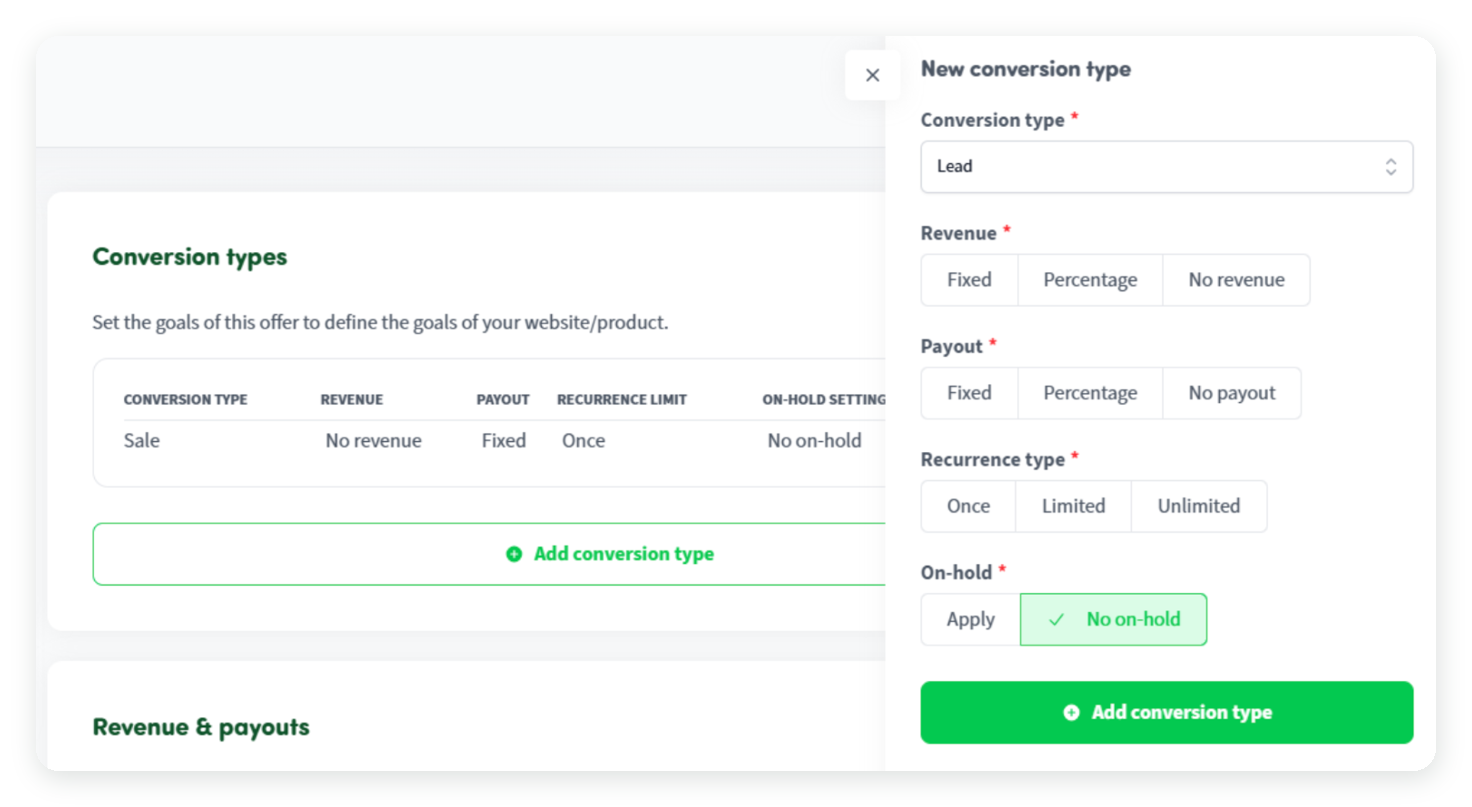
Match these settings to your affiliate terms. Check both browser cookie duration and server-side attribution expiration separately.
A new evaluation, however, may follow a different attribution rule. You can retain the original affiliate or credit the referral used for the latest purchase.
Example: Tracking multiple purchases from the same trader
Suppose your affiliate program retains the original partner for paid resets but attributes new evaluations according to the referral used for each purchase.
A trader purchases their first challenge through Partner A, later pays for a reset, and eventually buys an additional evaluation using Partner B's promo code.
| Transaction | Evaluation | Amount paid | Credited affiliate |
|---|---|---|---|
| First challenge purchase | Evaluation 1 | $120 | Partner A |
| Paid reset | Evaluation 1 | $30 | Partner A |
| Additional evaluation | Evaluation 2 | $180 | Partner B |
| Total | 2 evaluations | $330 |
With these rules, your reports would show:
- 1 newly acquired trader, originally referred by Partner A.
- 3 paid transactions across two evaluations.
- $150 in attributed sales for Partner A.
- $180 in attributed sales for Partner B.
Partner A brought in the trader and earned credit for the reset. Partner B drove a repeat sale.
Keep Your Affiliate Sales Data Accurate
Even a correctly attributed sale can inflate a partner's results if you count it twice or leave a refunded payment unchanged.
So before approving commissions, check for duplicate payments, refunds, and missing sales.
Prevent Duplicate Sales
Payment systems may send the same notification more than once. Your checkout and CRM could also report the same purchase independently, creating duplicate conversions.
To prevent duplicate submissions in Trackdesk, pass the unique payment reference as the External ID. For Affiliate Program accounts, its conversion deduplication mechanism accepts a given External ID only once per conversion type.
For example, if a $120 challenge payment is reported twice with the same External ID and conversion type, the duplicate submission shouldn't generate another recorded sale.
Use the same conversion type for a payment across all your integrations. If your checkout reports a payment as a challenge purchase and your CRM submits it under a different conversion type, the same transaction could still produce two conversion records.
You can also run into the opposite problem: if you use a trader ID instead of a payment ID, legitimate repeat purchases could be rejected as duplicates.
Track Refunds and Chargebacks
Update the original affiliate conversion when a trader receives a refund. Otherwise, you may report revenue the firm no longer retains.
When your source system sends a refund notification, use the External ID to update the corresponding conversion, as outlined in Trackdesk's refund integration guidance.
Use conversion statuses and holds to keep transactions under review separate from approved sales. Only approved conversions count toward affiliate billing, so you have time to validate purchases before commissions become payable.
The same care applies to canceled purchases, chargebacks, and challenge fee reimbursements for successful traders. Handle each according to your affiliate terms. A fee reimbursement, for example, may have different commission implications from a chargeback.
Agree with your finance team on how to handle revenue and commissions for each event, then use affiliate marketing automation to pass the corresponding updates through your integration.
Reconcile Affiliate Reports With Actual Sales
Your checkout revenue won't necessarily match the revenue in your affiliate reports. Some traders purchase directly, without an affiliate referral.
When reconciling the two reports, focus on payments that should have been credited to an affiliate but are missing.
Start by comparing transactions over the same reporting period, using consistent time zones, currencies, and payment statuses.
If an expected affiliate sale is missing, investigate the following:
- Did the confirmed payment reach the affiliate tracking platform?
- Was the referral information preserved through checkout?
- Did an attribution expiration rule, recurrence limit, or duplicate check reject the conversion?
- Does one report include pending or refunded transactions that the other excludes?
For this comparison, you can access individual conversion records or grouped data in Trackdesk's conversion and performance reports and filter the results by conversion type and status.
If you're investigating a missing sale, start with the conversion report. For a broader view of partner performance, use grouped reports.
And if you want to count newly acquired traders, cross-check the results against your CRM purchase history.
Test Your Prop Firm Affiliate Tracking Setup
Run test purchases before relying on your affiliate reports.
A successful first purchase is a good start, but you also need to test repeat sales, conflicting referrals, and payment changes.
Here's a checklist you can use to test those scenarios.
| Test scenario | Expected result |
|---|---|
| First challenge purchase | The correct affiliate, purchase amount, and new-buyer classification are recorded. |
| Conflicting affiliate link and promo code | The purchase is attributed according to your configured priority rules. |
| Paid reset without a new affiliate click | The payment follows the attribution policy associated with the existing evaluation. |
| Additional evaluation | The new purchase follows your attribution rules while preserving the trader's existing purchase history. |
| Subscription renewal | The subsequent payment is recorded with the appropriate referral information. |
| Duplicate payment notification | Only one sale is recorded. |
| Refund or chargeback | The original conversion reflects the appropriate payment status change. |
| Purchase without usable referral information | The transaction can be investigated without incorrectly assigning credit to an affiliate. |
Repeat these tests whenever you change a challenge product, checkout, integration, or affiliate terms.
If any of these tests reveal a discrepancy, investigate it before approving the affected commissions.
Build a more reliable affiliate tracking setup for your prop firm
Trackdesk lets you track challenge payments, apply your attribution rules to repeat purchases, and look up individual conversions when a partner queries a sale.
See how Nexgen ProTrader Funding built its affiliate program with Trackdesk and generated $331K in affiliate-driven revenue in five months.
Frequently Asked Questions
Can prop firms track affiliate sales across different checkout domains?
Yes. Pass the referral identifier between your website, trader dashboard, and checkout so it is available when your payment system reports the conversion. The exact integration depends on your infrastructure.
Can prop firms track affiliate challenge purchases after a trader changes devices?
Yes, if you can link the purchase to a known customer record, saved referral identifier, or affiliate promo code. S2S tracking alone cannot recognize a trader across devices.
Can affiliate tracking software distinguish new traders from returning customers?
Yes, if you supply the customer purchase history needed to classify each sale. Define what counts as a first purchase, then use CRM data and separate conversion types to record new and returning customers.
Can prop firms track challenge purchases without paying commissions on every transaction?
Yes. You can record purchases and apply different commission rules to first and repeat challenge purchases, paid resets, and renewals, depending on your platform configuration and affiliate terms.

Hi, I'm Alena! I've been in digital marketing since 2011, which feels like several lifetimes in an industry that reinvents itself every other Tuesday. My background spans B2B SaaS, e-commerce, and affiliate marketing technology.
At Trackdesk, I focus on content strategy, organic growth, and AI visibility. I enjoy digging into data, testing new tools, and sharing what I learn.
Have a question or an interesting idea? Drop me a line!